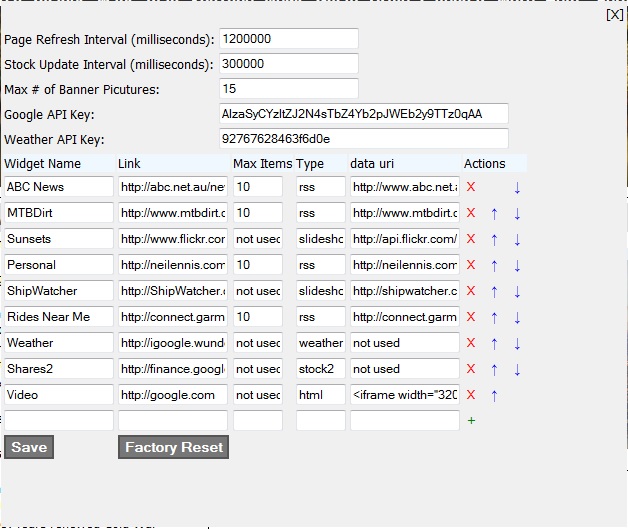
I prefer to use this facility to pull in Image feeds from Flickr.
The problem with the images in these feeds is that they’re either too large or too small.
The MediaRSS specification has a <media:thumbnail> tag which lets you have a thumbnail image in your feed. That’s great, but the image size of the thumbnail is 75×75 pixels, which is useless for a nice looking slideshow. It ends up looking terribly blurry with no detail.
The Google Ajax Feeds API tries to get around this by letting you specify a “thumbnailTag” in the slideshow options object. Basically, you set this to “content” to tell the API to look for the image in the “content” section of the feed, rather than the <media:thumnail> section. This is also great, but the problem is that Flickr uses the LARGE (or even worse, ORIGINAL) image size in this section. So you get nice large detailed images in the feed, but they’re so large that they take ages to load, and your slideshow sits there for ages saying “Loading….” while it grabs the huge images and chews up your audiences bandwidth.
So I wrote a simple PHP screen scraping utility which grabs the Flickr feed, and changes the ImageUrl…_L.jpg to ImageUrl….M.jpg – in other words, it modifies the feed to include the medium size image rather than the large size.
Medium sized images are fine for slideshows, and they load quite quickly.
Just save this in a file named FlickrRSS.php in the top folder of your wordpress directory. Then instead of using your flickr RSS feed, pass the feed as a query parameter to the PHP utility.
You’ll need to change the < and > tags in the file to < and >.
Lilly came in to my office the other day. “Dad I have to go out now. Can you get the TV to record my favourite show in an hour”.
“Hmmmm????”, I replied in typical pre-occuipied father mode.
But she had an intensity in her eye that made me realize I ignored this six year old at my peril, despite my displike of leaving my desk while in the middle of solving a problem.
Happily, I didn’t have to get up from my chair. I just logged in to IceTV, found the program she was interested in, and told my PVR to record it via the website. My PVR is a High-Definition Beyonwiz DP-S1. It’s wireless, but I’ve wired it in to the house LAN so we can watch movies from our D-Link DNS323 1TB NAS
We also have an older Topfield 5000 PVRT. It’s only standard definition, but the cool thing about it is that it has an open programming interfacem , so a lot of people have written their own software to get it to do cool things. One application I added to it was ToppyPC by John De Angelis. It has a program called “TWIN” which adds a web page to your Topfield PVR. So you can set timers, and record shows, like IceTV lets you do with the Beyonwiz. ToppyPC needs another utility to run – an FTP server (ftp4t by Aldarin) which runs on a PC which I connect to the Topfield via a USB cable.
All this technology is both good and bad. It’s convenient, but I don’t get the exercise I need going up and down stairs to program the PVR!
But at least I don’t have an angry six-year-old to contend with!
I haven’t seen an empty inbox for years, and I love it! When it’s full I feel like I have the cares of the world on my shoulders. But when it’s empty, it’s like I’m making progress. Even if it might be illusory, I like that feeling.
So I’m going to persist in my strategy which can be described simply as:
If it’s junk, get rid of it.
If it’s someone elses problem, forward it.
If it’s worth reading, read it now, then delete it.
If it needs more info, request more info and delete it.
If it needs acting on, then act on it now, then delete it.
It took me hours to find, but the easiest way I found to build a slideshow from a MediaRSS feed and add it to a WordPress blog was using the Google Ajax Feed API.
There are a few plug-ins that are supposed to work with WordPress, but I didn’t like them because they were really limited, or didn’t work on an IIS hosted blog. Good old Javascript, although it’s verbose, works fine.
That’s what I’ve used on this blog. Have a look at the slideshow on the lower right. It’s generated by the Google Ajax Feeds API.
If you don’t like getting your hands dirty with JavaScript, the best Flash based slideshow generator I know of is at VuVox.com. That’s what I use for some of the ObSrv examples of slideshows here.
The beauty of building a slideshow from an RSS Feed is that you don’t need to have the images on your own site, and the content updates continually as more items are added to the feed.
Of course, sometimes it’s hard to find a good feed. That’s where ObSrv.com comes in, because it can generate a feed from a google images search.
So when you use the Google Ajax Feed API and ObSrv.com you can make a slideshow of any topic you’d like. The one on this site is for “Information Technology”.
And just to make this post pretty, I thought I’d include a slideshow of the most recent ten pictures from the Creative Commons group on Flickr
Actually HashTags deserve a post all of their own. I’ll post something about that later.
I hope these links help. The bottom line for Twitter I think is to follow people who have something interesting to say. Don’t just follow anyone, because then the interesting comments will get drowned out with “noise”.
And the converse is that it’s important make your posts useful. Say stuff that will be interesting to people who follow you. Here’s some examples of people who post some really great twitter articles:
@Astro_Mike An Austronoaut tweeting from orbit @tferriss Author and blogger on lifestyle design @612brisbaneMy local ABC radio station
Oh, and if you’re interested, I’m on twitter as @NeilEnnis
I apologise for the unavailability of ObSrv.com over the last few days.
Our server failed, so we bought a new server, which also failed.
Not being one to give up easily, I’ve been on this issue since Friday lunchtime, and am relieved to say that as of about 10pm last night, everything is now working fine.
On the bright side, we have a larger, faster server so things should run much better than before.
To the right you can see a screen shot of three RSS feeds as seen on my iGoogle page. Two of them are good, one of them is not so good. Can you tell the difference?
They’re all really specific in nature. The first one just shows breaking news as reported by the ABC. The second shows recent posts made be people about cruises in Australia via the CruiseCritic.com message boards, and the third shows new posts to the “General Cruise Discussions” section of the OzCruiseCritics message boards.
With the ABC feed, whenever there’s a new story, it appears at the top of the list, pushing older stories off the bottom of the list.
Same with the Cruise Critic feed (the 2nd one). As a new post is received on a particular subject, that subject goes to the top of the list, pushing older ones off the bottom.
The problem with the third feed (“General Cruise Discussions”) is three-fold:
1. The name of the feed doesn’t do OzCruiseCritics justice. Anyone casting a quick glance at the feed doesn’t know where it’s from. With the first two feeds on this example, it’s quite plain who’s supplying them, but not the third feed.
2. The discussion topics are not formatted properly. The name of the feed is repeated in each of the item descriptions. E.g. you see “General Cruise Discussions :: Re: Queensland Cruise” and “General Cruise Discussions :: Re Snorkelling”. This is redundant. We already know what feed the item is coming from by looking at the title of the feed. Each of these items should have a more concise description. In this case they should be “Queensland Cruise” and “Snorkelling”.
3. You can’t see it from the picture, but take my word for it, whenver someone replies to a topic on the OzCruiseCritics feed, it generates a new feed item. So if I was to reply to the “Snorkelling” discussion, the feed would end up looking like this:
General Cruise Discussions :: RE: Snorkelling General Cruise Discussions :: RE: Queensland Cruise General Cruise Discussions :: RE: Snorkelling
I think that is crowded and difficult to read. What should really happen is that if an item is updated, it goes to the top of the list, and the old version of that item is removed from the list. So the feed should look like this:
Snorkelliung Queensland Cruise
These suggestions might seem pedantic, but the whole aim of RSS is to get your content read. Whish means the info needs to pack as much punch as possible, with as little clutter as possible. The reward for this is that your message gets out, more people hear what you say, and you get more traffic to your site.